Free plant and equipment compliance register template (Excel)
One spreadsheet for every statutory inspection regime that applies to plant, equipment and tools in a UK workplace: LOLER thorough examinations, PUWER inspections, PAT, calibration, pressure systems (PSSR), plus hand-arm vibration and noise exposure data. Enter each asset once and the sheet calculates next due dates and colour-codes anything that needs attention.
Free · no email required · .xlsx · works in Excel and Google Sheets
Disclaimer. This template is provided free of charge for general information purposes only. It does not constitute legal, health and safety, or professional advice, and is provided “as is” without warranties of any kind, express or implied. EquipReg accepts no liability for any loss or damage arising from its use. Statutory duties under PUWER 1998, LOLER 1998, PSSR 2000 and related regulations rest with the duty holder; the intervals shown are defaults and your own assessment or written scheme may require different ones. Always follow the advice of a competent person.
What's in the template
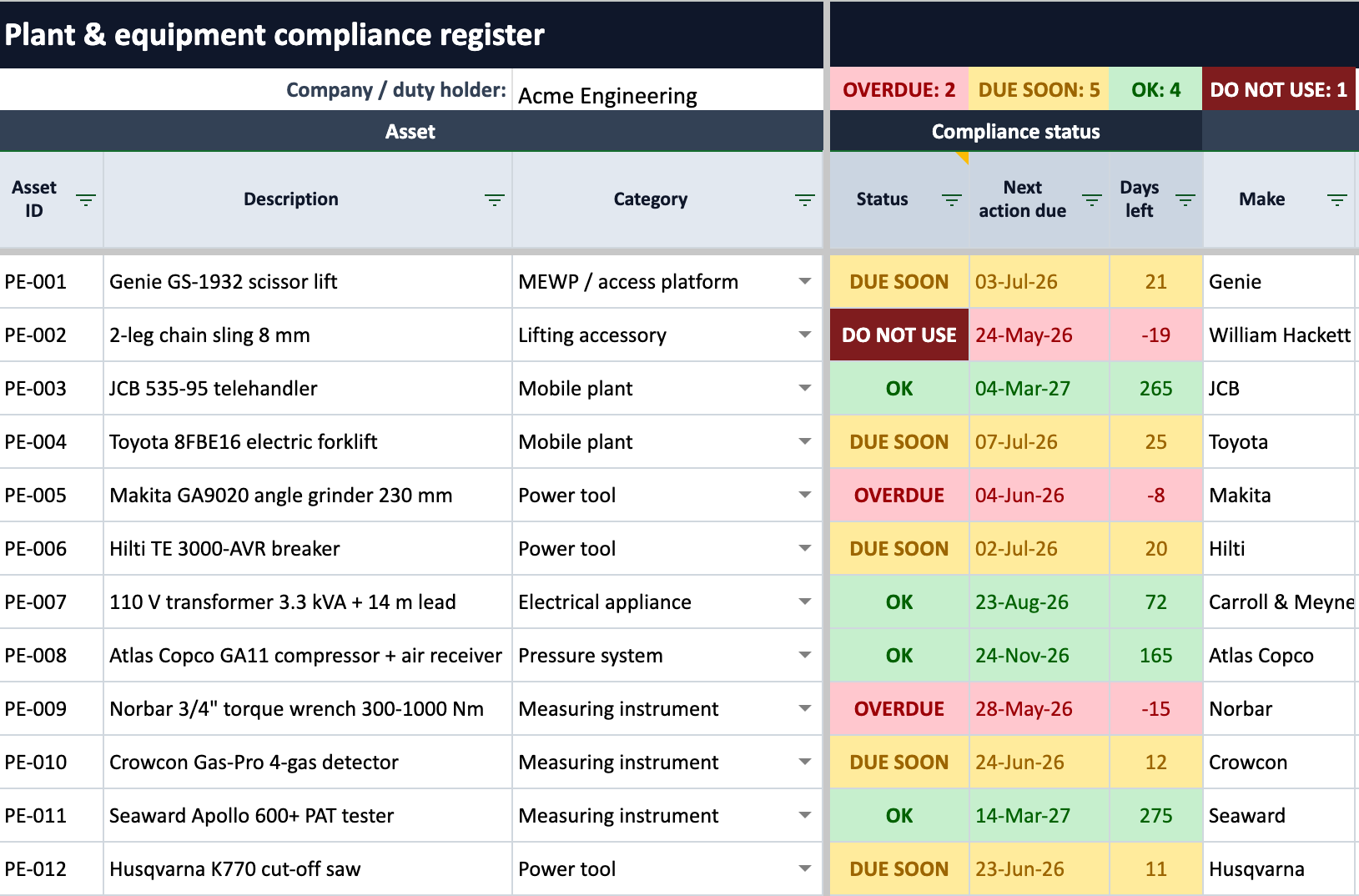
The register holds one row per asset with column groups for each compliance regime. Twelve realistic example assets (a scissor lift, chain sling, telehandler, breaker, compressor and more) show how to record common situations, including quarantined equipment, hired-in plant and lifting gear examined under LOLER rather than PUWER. Column headers carry notes telling you exactly which regulation each column satisfies.
| Regime | Applies to | What you record |
|---|---|---|
| LOLER thorough examination | Lifting equipment and accessories: cranes, forklifts, MEWPs, hoists, slings, shackles | Equipment type, SWL/WLL, examination interval, last and next examination, report ref, competent person, defect status |
| PUWER inspection | Any work equipment whose safety depends on installation conditions or that deteriorates in use | Inspection interval, last and next inspection, who inspected |
| PAT (portable appliance testing) | Portable and transportable electrical equipment: tools, leads, transformers, appliances | Electrical class (I/II/III), test interval, last and next test |
| Calibration | Instruments relied on for safety or quality: torque wrenches, gas detectors, PAT testers | Last and next calibration, certificate type (UKAS or traceable), certificate ref |
| PSSR pressure systems | Systems with a relevant fluid: compressed air receivers, steam boilers | Written scheme in place, examination interval, last and next examination |
| HAVS and noise data | Hand-held and hand-guided power tools, small plant | Declared vibration (a + K), HSE exposure points per hour, trigger time to action and limit values, noise dB(A) |
Beyond the regime columns, every asset carries its core details: ID, description, category, make, model, serial number, year, location, custodian, ownership (owned or hired with on/off-hire dates), operational status and date into service.
Due dates and status, calculated for you
Enter the last inspection date and interval for each regime that applies, and the sheet works out the next due date, an overall status per asset, and counters at the top of the register. The LOLER interval even fills itself from the equipment type: 6 months for anything that lifts people and for all accessories, 12 months otherwise.
- OVERDUE A next action date has passed — inspect before further use.
- DUE SOON Something falls due within the next 30 days — book it now.
- OK All applicable regimes are in date.
- DO NOT USE Quarantined, or a dangerous defect is recorded — the law prohibits use until remedied.
How to use it
Hover over any column header in the sheet with a note marker to see exactly which regulation that column satisfies — the workbook also includes its own "How to use" tab.
- 1
Replace the example assets with your equipment
The register ships with 12 realistic example assets in rows 5 to 16: a scissor lift, chain sling, telehandler, forklift, angle grinder, breaker, transformer, compressor, torque wrench, gas detector, PAT tester and cut-off saw. Type over them with your own equipment. The examples use live formulas for their dates so the colour coding always demonstrates each state.
- 2
Mark which regimes apply to each asset
For each asset, set the drop-down in each regime block (LOLER, PUWER, PAT, calibration, PSSR) to "Yes" where that regime applies, then enter the inspection interval in months and the date of the last inspection, examination or test.
- 3
Let the sheet calculate due dates and status
The next-due columns, the days-left counter, the overall status per asset and the summary counters at the top of the sheet all update automatically. Sort or filter by the status column to get your action list.
- 4
Check the LOLER interval
The LOLER thorough examination interval fills itself from the equipment type: 6 months for anything that lifts people and for all lifting accessories, 12 months for other lifting equipment. If your competent person’s written examination scheme sets different intervals, type over it.
- 5
Add more rows as your register grows
Insert new rows above row 64, then copy a blank row’s formulas and drop-downs into the new row — copy a blank row near the bottom and use "Insert copied cells".
Things people get wrong
The 12 example assets in the template are chosen to demonstrate these — keep them around until you've read each one.
- Lifting equipment is examined under LOLER, not PUWER — PUWER regulation 6(5) exempts it to the extent LOLER covers the same risk. A PUWER line is still sensible for non-lifting aspects, such as brakes and tyres on a telehandler.
- Hired-in lifting equipment still needs evidence: obtain a copy of the current thorough examination report before first use (LOLER regulation 9(4)).
- New lifting equipment with a Declaration of Conformity under 12 months old does not need a thorough examination before first use (unless assembled on site) — keep the declaration with the asset.
- A dangerous defect means the equipment must not be used until fixed, and the competent person sends a copy of the report to the enforcing authority.
- "Annual PAT" is a myth — the HSE says so explicitly. Set intervals by use and environment: a 110 V site grinder needs testing far more often than an office monitor lead.
- Multi-mode tools such as SDS drills and breakers can vary tenfold in vibration between modes — record the worst-case figure for the work you actually do.
- A maintenance log is not an inspection record — PUWER regulation 5 (maintenance) and regulation 6 (inspection) are separate duties, and the HSE expects separate evidence for each.
- Records may be electronic, but they must be available to an HSE inspector on request and protected from alteration — export or print the register for audits.
Frequently asked questions
What must a plant and equipment register contain?
For each asset: identification (ID, description, make, model, serial number), location and custodian, which inspection regimes apply (LOLER, PUWER, PAT, calibration, PSSR), the date and result of the last inspection or examination under each regime, the next due date, certificate or report references, and any defects with their remedy-by dates. This template includes all of these columns.
Is an equipment register a legal requirement in the UK?
The register format itself is not prescribed by law, but the records inside it are. LOLER 1998 requires written thorough examination reports to be kept, PUWER 1998 requires inspection records to be kept at least until the next inspection, and PSSR 2000 requires a written scheme of examination. A register is the accepted way to organise this evidence and show an HSE inspector you are in control.
Is this template really free?
Yes. It is a free download with no email address required, and you can use and share it freely. It is provided as a general record-keeping aid without warranties of any kind.
Does it work in Google Sheets?
Yes. The status formulas, due-date calculations and drop-downs work in Google Sheets as well as Microsoft Excel. Upload the .xlsx file to Google Drive and open it with Google Sheets.
What is the difference between a LOLER register and a PUWER register?
A LOLER register records thorough examinations of lifting equipment (every 6 or 12 months by a competent person). A PUWER register records inspections of work equipment more generally, at intervals set by your own assessment of the risk. This template handles both in one sheet, with separate column groups for each regime, because many assets (a telehandler, for example) need records under both.
How often should I update the register?
Every time an inspection, examination, test or calibration happens, and whenever equipment arrives, moves site, goes on or off hire, or is quarantined with a defect. The status column and due-date counters only protect you if the dates behind them are current.
How does the colour-coded status work?
The sheet looks at the next due date across every regime that applies to an asset and shows OVERDUE when a date has passed, DUE SOON when something falls due within 30 days, OK when everything is in date, and DO NOT USE when the asset is quarantined or a dangerous defect is recorded.
Outgrowing the spreadsheet?
A spreadsheet won't chase due dates for you, store certificates against the right asset, or give you an audit trail that can't be edited. EquipReg is the plant and equipment register that does — with reminders before anything falls due and AI that builds your register from the certificates you already have.
Get early accessDisclaimer
This template is provided free of charge for general information purposes only. It does not constitute legal, health and safety, or professional advice, and is provided "as is" without warranties of any kind, express or implied. EquipReg accepts no liability for any loss or damage arising from its use. Statutory duties under PUWER 1998, LOLER 1998, PSSR 2000 and related regulations rest with the duty holder; the intervals shown are defaults and your own assessment or written scheme may require different ones. Always follow the advice of a competent person.